





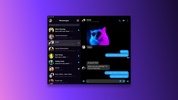

Messenger is the messaging tool developed by Meta that allows you to contact all the people you have added to Facebook. Through this PC version, you can easily open chats or manage video calls without using the Android app.
The way Messenger works for Windows is almost identical to the mobile version. When you launch the program, you will find a general window where you can view all the chats you have open. Similarly, on the left side of the screen, there is a list that you can click on to open each conversation. What's more, from here, you can set many filters to locate chats instantly.
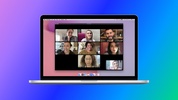
Needless to say, in Messenger, you can also open the video call function to contact other people via video. This is very interesting in the Windows version because you can take advantage of the potential of the PC's webcam to stream in high quality.
Messenger for PC allows you to easily connect with your Facebook contacts and chat via text or video. The tool incorporates everything you find in the Android APK or the browser version, so you will already know how it works.


 146 reviews



















Comments
I have validated this application
Very good
Very excellent
Excellent
cool
VERY GOOD